We Use CookiesWe use cookies to enhance the security, performance, functionality and for analytical and promotional activities. By continuing to browse this site you are agreeing to our privacy policy

10 Best Midi Controllers 2026 in the United States
How do we rank products for you?

Our technology thoroughly searches through the online shopping world, reviewing hundreds of sites. We then process and analyze this information, updating in real-time to bring you the latest top-rated products. This way, you always get the best and most current options available.

headphones-stars

Our Top Picks

#1

Winner

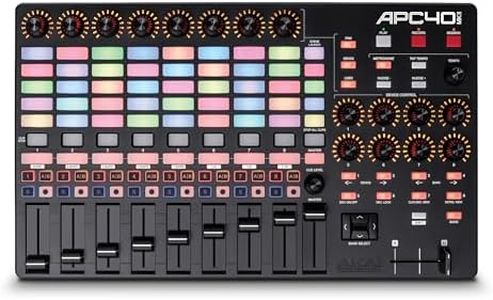
Akai Professional APC40 MKII - USB MIDI Controller for 1 to 1 Mapping with Ableton Live Lite with 5x8 Clip Launch Matrix, Knobs and Faders, Pro Software Suite Included

Rating
10.0
Chosen by1,471
Build Quality and Portability
Software Integration
Control Knobs, Faders, and Buttons

Most important from
855 reviews

Build Quality and Portability
The controller feels extremely solid and durable, standing out from other equipment that often uses cheaper materials.
Software Integration
Plugging it in and starting to use it with Ableton Live requires no configuration or drivers, making setup effortless.
Control Knobs, Faders, and Buttons
Knobs and faders have a heavy-duty feel, contributing to a premium tactile experience during performances.

The Akai Professional APC40 MKII is a well-suited MIDI controller for musicians and producers who work with Ableton Live. It features a 5x8 clip-launch matrix with color-coded RGB feedback, making it easy to launch and manage clips during live performances or studio sessions. The controller offers 9 faders, 8 control knobs, and 8 device controls, providing hands-on manipulation of mixer settings, virtual instruments, and effects, which is great for dynamic control. The built-in assignable A/B crossfader adds flexibility, especially for DJ-style mixing or creative transitions.

Connectivity is straightforward with USB plug-and-play support for both Mac and PC, simplifying setup without extra drivers. The APC40 MKII is powered via USB, so you don’t need an additional power source, which helps with portability. Its build uses durable high-grade plastic, balancing sturdiness with a relatively lightweight design (about 1.8 kg) and a compact footprint, making it manageable for gigging musicians.

One of its strong points is seamless integration with Ableton Live (versions 9.1.3 and above), including a comprehensive software bundle, which is helpful for beginners and professionals alike. It lacks traditional piano-style keys or velocity-sensitive pads, so if you need a controller for playing melodies or drum patterns, this might not cover those needs. This controller focuses more on clip launching, mixing, and effects control rather than note input. The APC40 MKII is ideal for users who want tight, tactile control over Ableton Live’s clip launching and mixing features, especially for live performance and electronic music production. If you want a versatile, durable controller mainly for Ableton Live with lots of faders and knobs but don’t need keys or pads for playing notes, this device fits well. Those needing a more piano-style or pad-focused controller may want to consider other options.

Rating
10.0
Chosen by1,471
Build Quality and Portability
Software Integration
Control Knobs, Faders, and Buttons

Most important from
855 reviews

Build Quality and Portability
The controller feels extremely solid and durable, standing out from other equipment that often uses cheaper materials.
Software Integration
Plugging it in and starting to use it with Ableton Live requires no configuration or drivers, making setup effortless.
Control Knobs, Faders, and Buttons
Knobs and faders have a heavy-duty feel, contributing to a premium tactile experience during performances.
#2

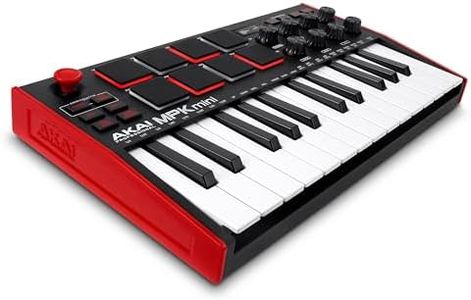
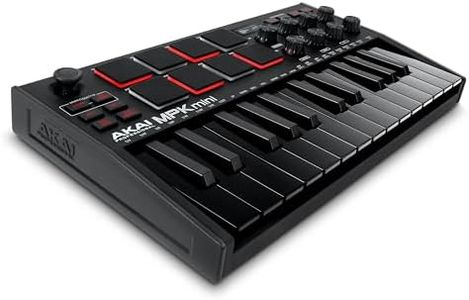
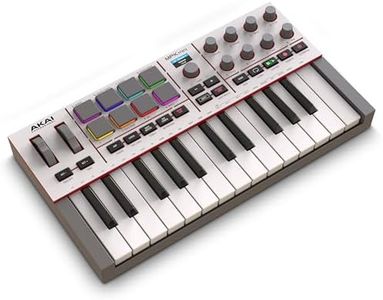
Akai Professional MPK Mini MK3 25 Key USB MIDI Keyboard Controller With 8 Backlit Drum Pads, 8 Knobs, Music Production Software and Native Instruments Sound Package (NKS Integration), Black

Rating
9.7
Number of Keys/Pads
Key/Pad Sensitivity
Control Knobs, Faders, and Buttons

Most important from
30755 reviews

Number of Keys/Pads
Despite having only 25 keys spanning two octaves, octave shift buttons maintain full usability in a highly portable design.
Key/Pad Sensitivity
The keys offer comfortable sensitivity and the pads respond instantly with no delay, making beat creation fluid and engaging.
Control Knobs, Faders, and Buttons
The knobs turn smoothly and precisely, enabling intuitive control over effects and automation.
Connectivity
Setup is effortless with true plug-and-play functionality, allowing immediate connection to computers and music software.
Software Integration
Bundled software and plugins add significant creative potential, making it an ideal all-in-one starter kit for producers.
Build Quality and Portability
Its compact size fits perfectly in small spaces without sacrificing a professional feel or sturdy build quality.

The Akai Professional MPK Mini MK3 is a compact and highly portable MIDI controller that fits well for music producers who need a small but versatile device. It features 25 velocity-sensitive mini keys, which provide decent playability but may feel limited if you want a full keyboard range. The 8 backlit MPC-style pads are responsive and great for finger drumming or sample triggering, and they include useful features like Note Repeat and Full Level. You also get 8 assignable knobs that rotate fully, which let you control plugins, effects, and other software parameters easily, adding to creative flexibility.

The built-in 4-way thumbstick offers intuitive pitch and modulation control, plus there’s a built-in arpeggiator with adjustable settings, helping add musical expression. Connectivity is straightforward with USB powering and data transfer, plus a sustain pedal input, making it compatible with most Mac and Windows DAWs.

Software integration is a strong point, as it supports Native Kontrol Standard (NKS) and comes bundled with a selective Komplete 15 sound package and MPC Beats production software, making it friendly for beginners and those who want an all-in-one starter kit. Also, the included two months of Splice access gives extra sample options. Build quality feels solid for a lightweight plastic unit, balancing durability and portability for studio or travel use. If you need more keys or larger pads, or prefer semi-weighted keys, this might feel limiting; it suits electronic music producers, beat makers, and hobbyists wanting a compact controller loaded with useful features without overwhelming complexity.

Rating
9.7
Number of Keys/Pads
Key/Pad Sensitivity
Control Knobs, Faders, and Buttons

Most important from
30755 reviews

Number of Keys/Pads
Despite having only 25 keys spanning two octaves, octave shift buttons maintain full usability in a highly portable design.
Key/Pad Sensitivity
The keys offer comfortable sensitivity and the pads respond instantly with no delay, making beat creation fluid and engaging.
Control Knobs, Faders, and Buttons
The knobs turn smoothly and precisely, enabling intuitive control over effects and automation.
Connectivity
Setup is effortless with true plug-and-play functionality, allowing immediate connection to computers and music software.
Software Integration
Bundled software and plugins add significant creative potential, making it an ideal all-in-one starter kit for producers.
Build Quality and Portability
Its compact size fits perfectly in small spaces without sacrificing a professional feel or sturdy build quality.
#3

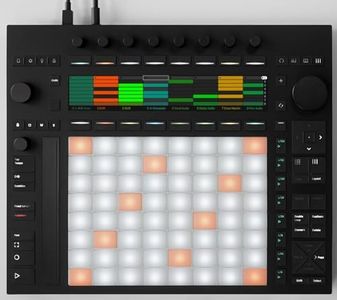
Ableton Push 3 Desktop Controller Workstation w/ 64 MPE pads and Audio Interface

Rating
9.1
Software Integration
Build Quality and Portability

Most important from
42 reviews

Software Integration
This controller is perfectly paired with Ableton Live, making production quick, simple, and fun without sacrificing advanced functionality.
Build Quality and Portability
The Push 3 is a solid investment that will last for years in both live performances and studio work.

The Ableton Push 3 is a powerful MIDI controller designed mainly for users of Ableton Live software, making it an excellent choice if you want deep integration with this platform. It features 64 pressure- and movement-sensitive MPE pads, which let you play very expressively—think of bending notes or adding subtle finger movements, not just pressing buttons. This makes it great for finger drumming, melodic playing, and expressive performances. The controller also includes several control knobs and buttons, giving you hands-on access to many software functions without needing a mouse or keyboard.

A major plus is the built-in audio interface with multiple inputs and outputs, allowing you to connect instruments, microphones, or other gear directly, which turns the Push 3 into a creative hub for recording and live performance. The device connects to your computer via USB-C and requires Ableton Live running on your Mac or PC, making it less suited if you want a standalone unit or to use other DAW software.

The build is solid yet compact and portable, with a metal and plastic design that feels durable. However, the controller must always be tethered to a computer, so it’s not ideal if you seek a fully mobile setup without a laptop. The Push 3 performs exceptionally well for Ableton Live users who want expressive playing and versatile studio connectivity, but it may be more specialized than basic MIDI controllers for casual or beginner users.

Rating
9.1
Software Integration
Build Quality and Portability

Most important from
42 reviews

Software Integration
This controller is perfectly paired with Ableton Live, making production quick, simple, and fun without sacrificing advanced functionality.
Build Quality and Portability
The Push 3 is a solid investment that will last for years in both live performances and studio work.

Buying Guide for the Best Midi Controllers

When choosing a MIDI controller, it's important to consider how you plan to use it and what features will best support your music production or performance needs. MIDI controllers come in various shapes and sizes, each offering different functionalities. Understanding the key specifications will help you make an informed decision and find the best fit for your requirements.
Number of Keys/PadsThe number of keys or pads on a MIDI controller determines how many notes or sounds you can play simultaneously. This is important because it affects the range and complexity of the music you can create. Controllers with 25 keys are compact and portable, suitable for simple melodies and basslines. Controllers with 49 or 61 keys offer a wider range, making them ideal for more complex compositions. Full-sized 88-key controllers are best for pianists and those who need a full range of notes. Similarly, the number of pads can vary, with more pads allowing for more intricate drum patterns and sample triggering.
Key/Pad SensitivityKey or pad sensitivity refers to how responsive the keys or pads are to the force with which they are played. This is important for expressive playing, as it allows for dynamic control over the volume and intensity of the notes. Controllers with velocity-sensitive keys or pads can detect how hard or soft you play, adding nuance to your performance. Some controllers also offer aftertouch, which responds to pressure applied after the initial strike. If you need expressive control, look for controllers with high sensitivity and aftertouch capabilities.
Control Knobs, Faders, and ButtonsControl knobs, faders, and buttons allow you to manipulate various parameters within your music software, such as volume, panning, and effects. This is important for hands-on control and real-time adjustments during production or performance. The number and type of controls can vary widely. Basic controllers may have a few knobs and buttons, while more advanced models offer multiple faders, rotary encoders, and assignable buttons. Consider how much control you need and whether you prefer tactile interaction with your software.
ConnectivityConnectivity options determine how the MIDI controller interfaces with your computer or other devices. This is important for ensuring compatibility and ease of use. Most controllers connect via USB, which is standard for modern setups. Some also offer traditional MIDI ports for connecting to other MIDI hardware. Wireless options are available for greater flexibility and mobility. Ensure the controller you choose has the necessary connections for your setup, whether it's a simple USB connection or more complex MIDI routing.
Software IntegrationSoftware integration refers to how well the MIDI controller works with your digital audio workstation (DAW) or other music software. This is important for a seamless workflow and efficient music production. Some controllers come with pre-mapped controls for popular DAWs, making setup quick and easy. Others offer customizable mapping, allowing you to assign controls to specific functions within your software. If you use a specific DAW, look for controllers that offer tight integration with that software to enhance your productivity.
Build Quality and PortabilityBuild quality and portability affect the durability and convenience of the MIDI controller. This is important for both studio use and live performances. Controllers made from high-quality materials are more likely to withstand heavy use and last longer. Portability is a key factor if you plan to travel with your controller or use it in different locations. Lightweight and compact models are easier to transport, while larger, sturdier models may offer more features but are less portable. Consider your usage scenario and choose a controller that balances build quality with portability.

FAQ

Most Popular Categories Right Now